Transfer Learning is a machine learning technique where a model trained on one task is reused and adapted to solve a different but related task. Instead of building a model from scratch, you leverage a pretrained model that has already learned useful patterns from large-scale data.
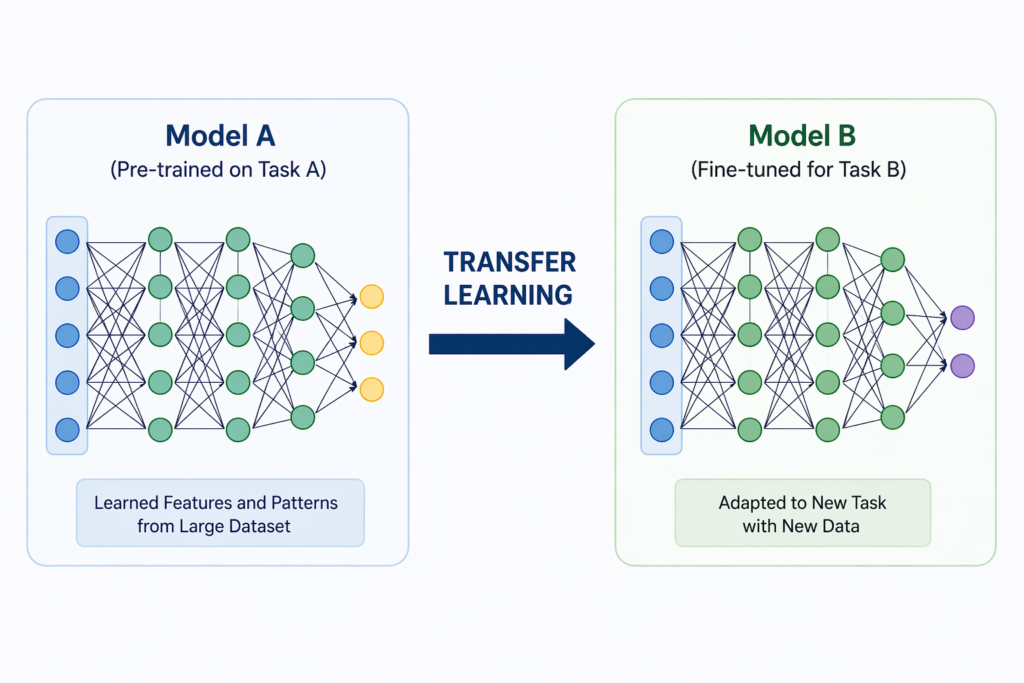
In traditional machine learning:
- You start with an empty model
- Train it using large datasets
- Spend time and compute to make it accurate
But with transfer learning:
- You start with an already trained model
- Reuse its learned knowledge
- Fine tune it for your specific problem
This dramatically reduces effort while improving performance.
Training a Model is difficult
Training a neural network from scratch sounds exciting. until you realize how expensive it actually is.It requires:
- Massive amounts of data
- High computational power
- Significant training time
And in most real-world scenarios, that’s simply not practical. This is where Transfer Learning completely changes the game. You’re not building intelligence from scratch you’re reusing existing intelligence.
Real Life analogy of Transfer Learning
Imagine you already know how to ride a bicycle. Now learning a motorcycle becomes easier because:
- You already understand balance
- You already know how to steer
- You already have coordination
You’re not starting from zero then you’re adapting existing knowledge and using/transferring your existing knowledge to learn new things.
How Transfer Learning Works
When a model is trained on large datasets then we know that is doesn’t store the actual data. In reality it learns about
- Patterns
- Features
- Relationships
Example:
- Image models learn edges, shapes, textures
- NLP models learn grammar and context
Instead of retraining everything and spending too much amount of money and time. you need to
- Load a pretrained model
- Keep learned layers
- Modify final layers
- Train on your dataset
Benefits of Transfer learning
- Faster learning
- Less Data required
- Lower Cost
- Better Accuracy
Types of Transfer Learning
Feature Extraction
- Use pretrained model as-is
- Train only final layer
Fine-Tuning
- Modify deeper layers
- Adapt model more precisely
Domain Adaptation
- Same task, different dataset
Transfer Learning of models using TensorFlow
Step 1: Install Tensorflow
pip install tensorflowStep 2: Write code to train a model from the existing model
import tensorflow as tf
from tensorflow import keras
from tensorflow.keras import layers

# Load pretrained model
base_model = keras.applications.MobileNetV2(
    input_shape=(224, 224, 3),
    include_top=False,
    weights='imagenet'
)

# Freeze base model
base_model.trainable = False

# Add custom layers
x = base_model.output
x = layers.GlobalAveragePooling2D()(x)
x = layers.Dense(128, activation='relu')(x)
output = layers.Dense(1, activation='sigmoid')(x)

# Final model
model = keras.Model(inputs=base_model.input, outputs=output)

# Compile
model.compile(
    optimizer='adam',
    loss='binary_crossentropy',
    metrics=['accuracy']
)

model.summary()Let’s understand the important parts of your code in step by step fashion
- keras.applications.MobileNetV2
- This loads MobileNetV2, which is a pretrained deep learning model.
- It has already been trained on a huge dataset called ImageNet.
- ImageNet contains millions of images from thousands of categories.
- So this model has already learned useful image features like:
- edges
- shapes
- textures
- patterns
input_shape=(224, 224, 3)- This tells the model the shape of input images.
224= image height224= image width3= RGB color channels- So each image must be of size 224 × 224 pixels with 3 color channels.
include_top=Falseremoves the original classification layer.weights='imagenet'uses pretrained knowledge.- base_model.trainable = False
- We freeze the pretrained model so its learned features don’t change.
- x = base_model.output
- This takes the output of the pretrained model, which contains extracted features from images.
- Then we created the final model and complied it to generate a new model
It’s normal to not understand this code but you should understand the concept of Transfer learning
Comparison between Transfer Learning and Creating from scratch
| Feature | Training from Scratch | Transfer Learning |
|---|---|---|
| Data Required | Very High | Low |
| Training Time | Long | Short |
| Cost | Expensive | Affordable |
| Accuracy | Needs tuning | Often better |
| Use Case | Large-scale systems | Most real world apps |
Frequently Asked Questions
What is transfer learning in simple words?
It means reusing a pretrained model and adapting it for a new task.
Is transfer learning better than training from scratch?
Yes, in most real-world cases where data and compute are limited.
Which models are used in transfer learning?
Popular ones include MobileNet, ResNet, BERT, GPT.
Do I need GPU for transfer learning?
Not always. It can work even on CPU for small tasks.
 Raj Ranjan